School management software
Run the whole school from one calm place.
Admissions, attendance, timetables, report cards, fees, buses and payroll, connected for principals, teachers and parents. It works offline, and it speaks Arabic, English and Irish.
Prefer a person? Book a live demo.
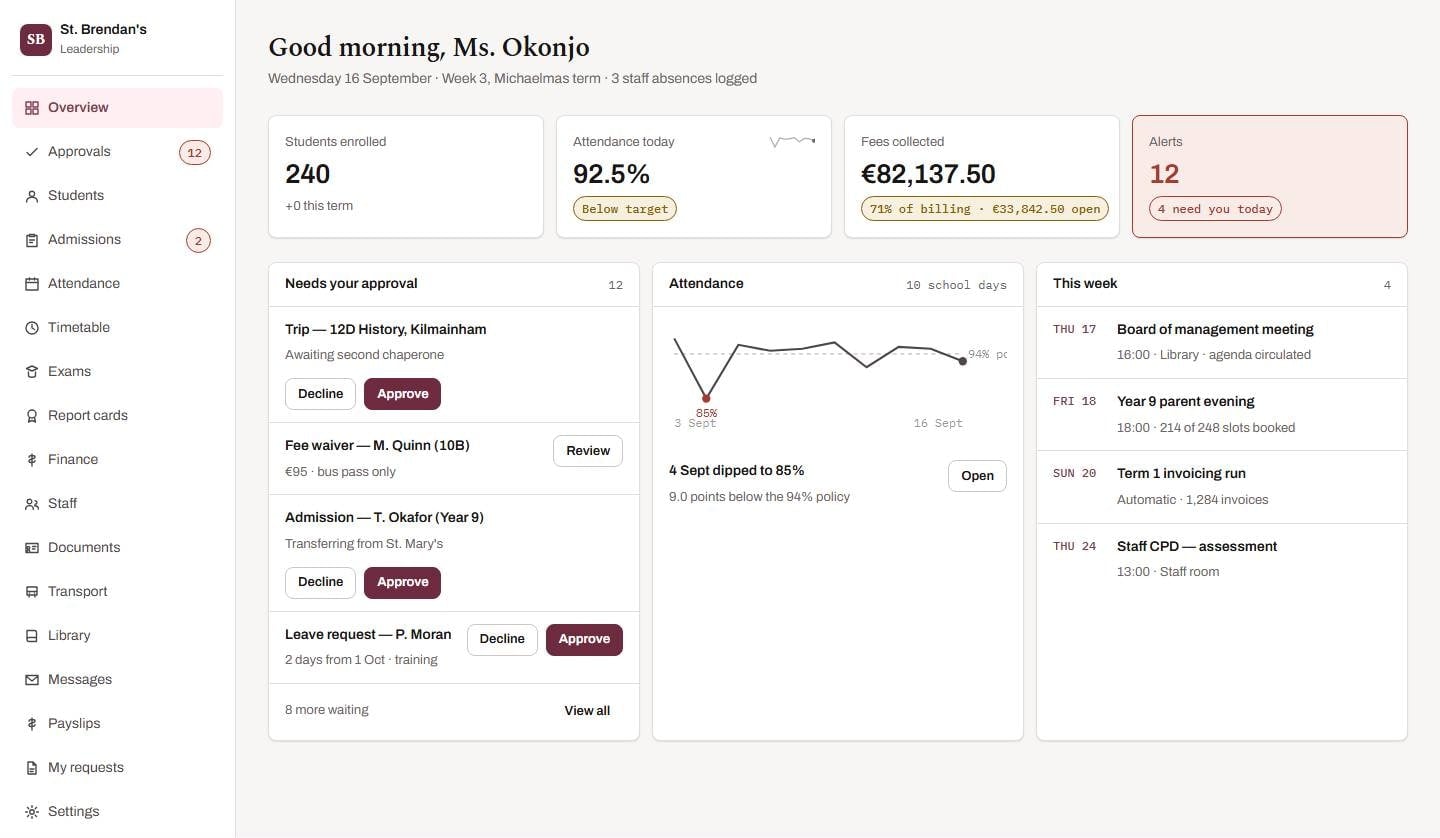
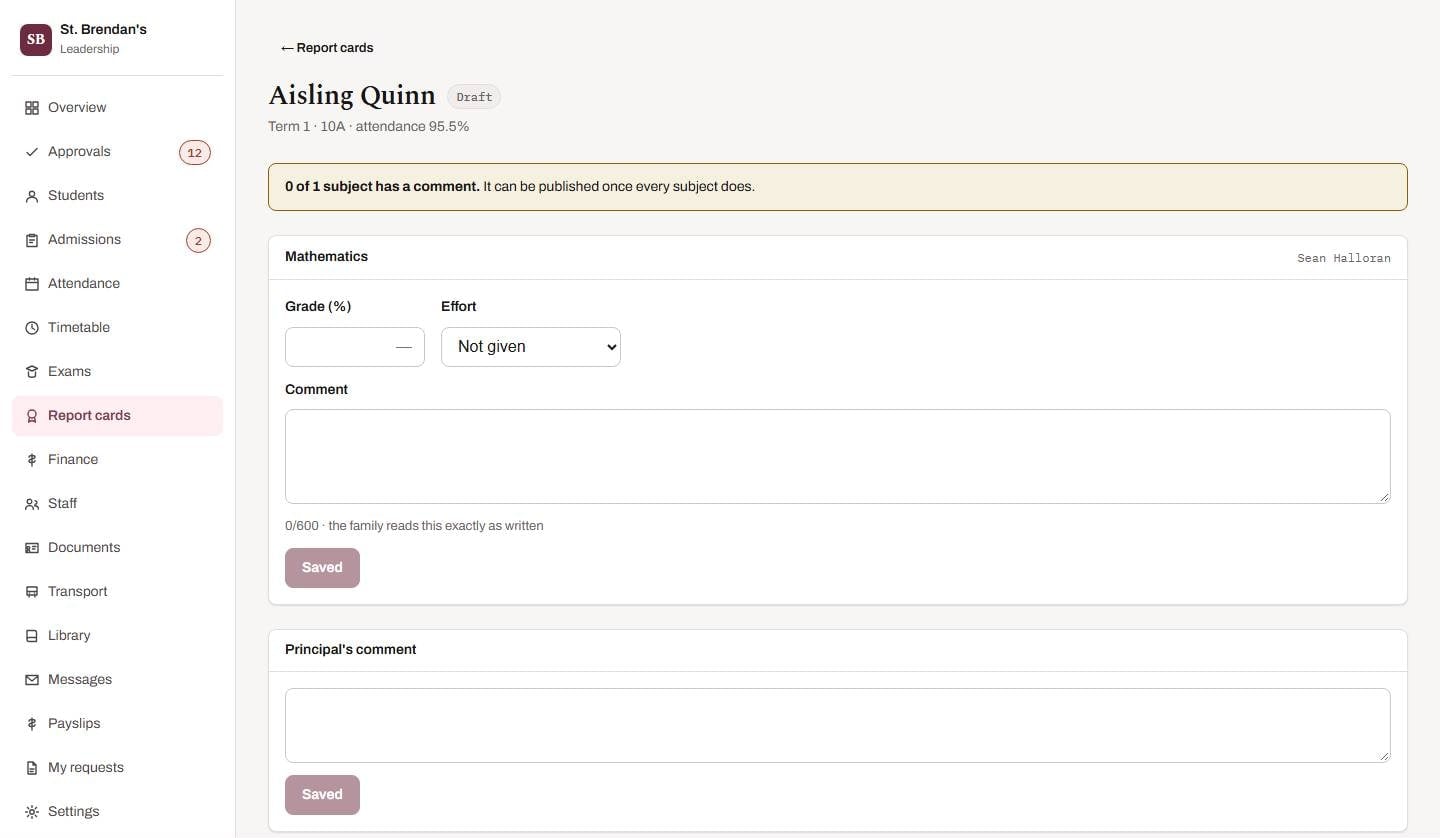
Principal. Decisions to make, not a wall of numbers.
- 12 connected modules, one login
- Desktop app (iOS and Android coming soon)
- Offline registers, right-to-left languages
The problem
Schools don’t fail for lack of software. They struggle with too much of it.
A register on paper, fees in one spreadsheet, the bus list on a clipboard, parents on a WhatsApp group — and three different attendance figures depending on who you ask. Every extra tool is another login, another export and another chance for two records to disagree.
- One record for every student — so the office, the teacher and the parent see the same thing.
- One attendance rule feeding dashboards, parent screens and report cards — never two numbers to reconcile.
- One place to sign in, with a workspace shaped to each person's job.
Before
After
Schoolhouse- Attendance & Registers
- Timetable
- Report Cards & Exams
- Admissions & Enrolment
- Fees & Finance
- Transport & School Bus
- Library
- Staff, Leave & Payroll
- Certificates & ID Cards
- Messages & Notifications
- Coursework & Marking
- Mobile Apps & Family Portal
Twelve modules. One login. One record.
Twelve modules, one platform
Everything your school does, connected.
Start with the essentials and add modules as you grow. Each one shares the same students, the same rules and the same login — so nothing has to be copied from one system to another.
Staff, Leave & Payroll
A private staff directory, leave that checks itself, and payroll you finalise on purpose.
Mobile Apps & Family Portal
iOS and Android apps, coming soon, that extend the platform rather than duplicate it.
One platform, a workspace for every role
Everyone sees their school.
Schoolhouse is built around the people who use it. Each role opens on the screen that matters most to their day — and only ever shows what that role is allowed to see.
Decisions to make, not a wall of numbers.
The dashboard opens on what needs you today — approvals, attendance that has slipped, fees outstanding — because the question a principal arrives with is 'what needs me?'
- An approvals queue with one-press approve and undo
- Attendance against your policy, with dips flagged
- Fees collected, outstanding and overdue at a glance
- The week ahead: meetings, parent evenings, invoicing runs
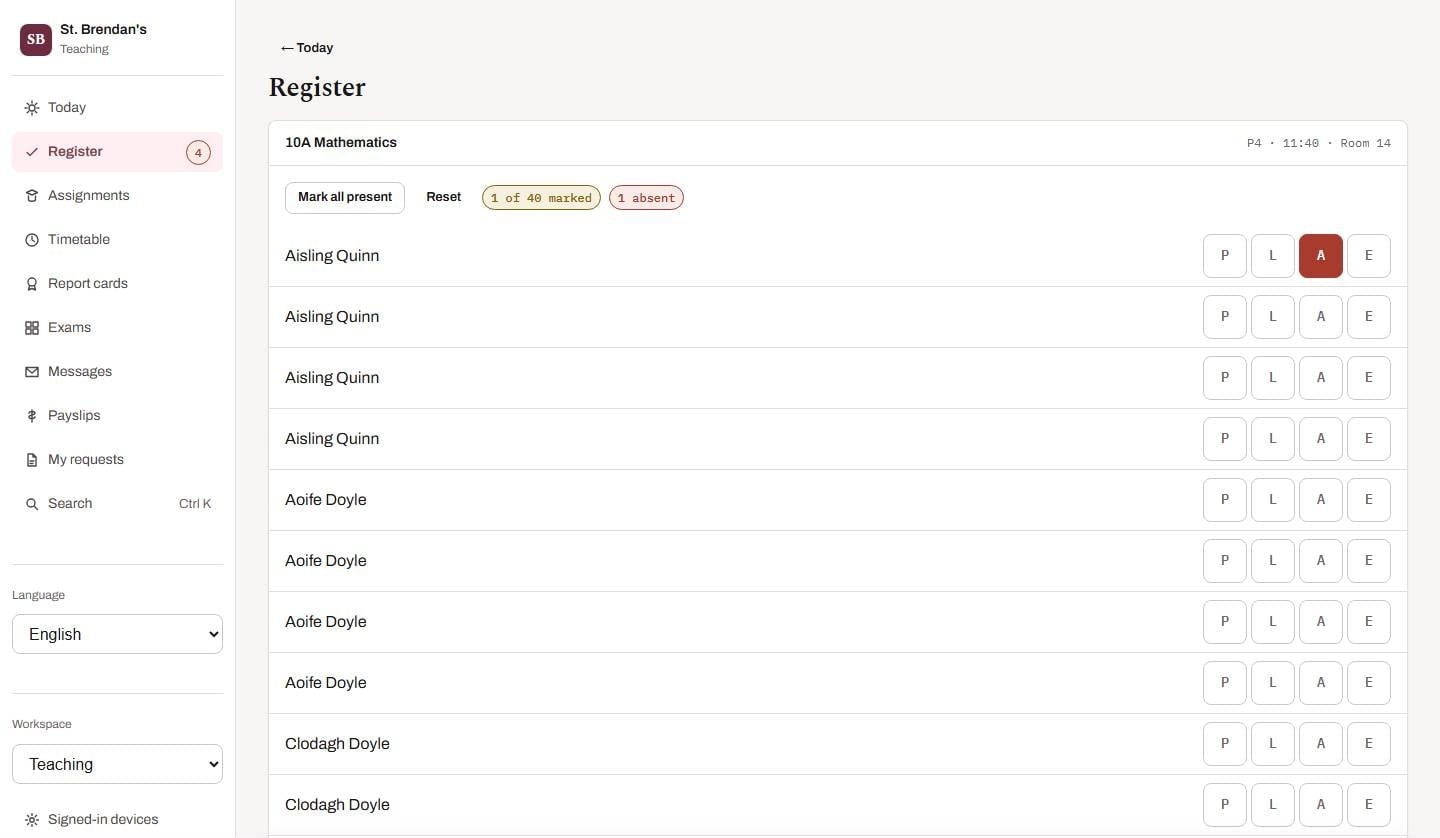
The register is the job. So it comes first.
A teacher's day starts with the lessons in front of them. Taking the register is two taps, works offline, and the rest of the job — setting and marking work, report comments, leave — is one tap further.
- Registers where everyone starts present
- Offline registers that send themselves once
- Set, collect and mark work with feedback
- Comment only on the subjects you teach
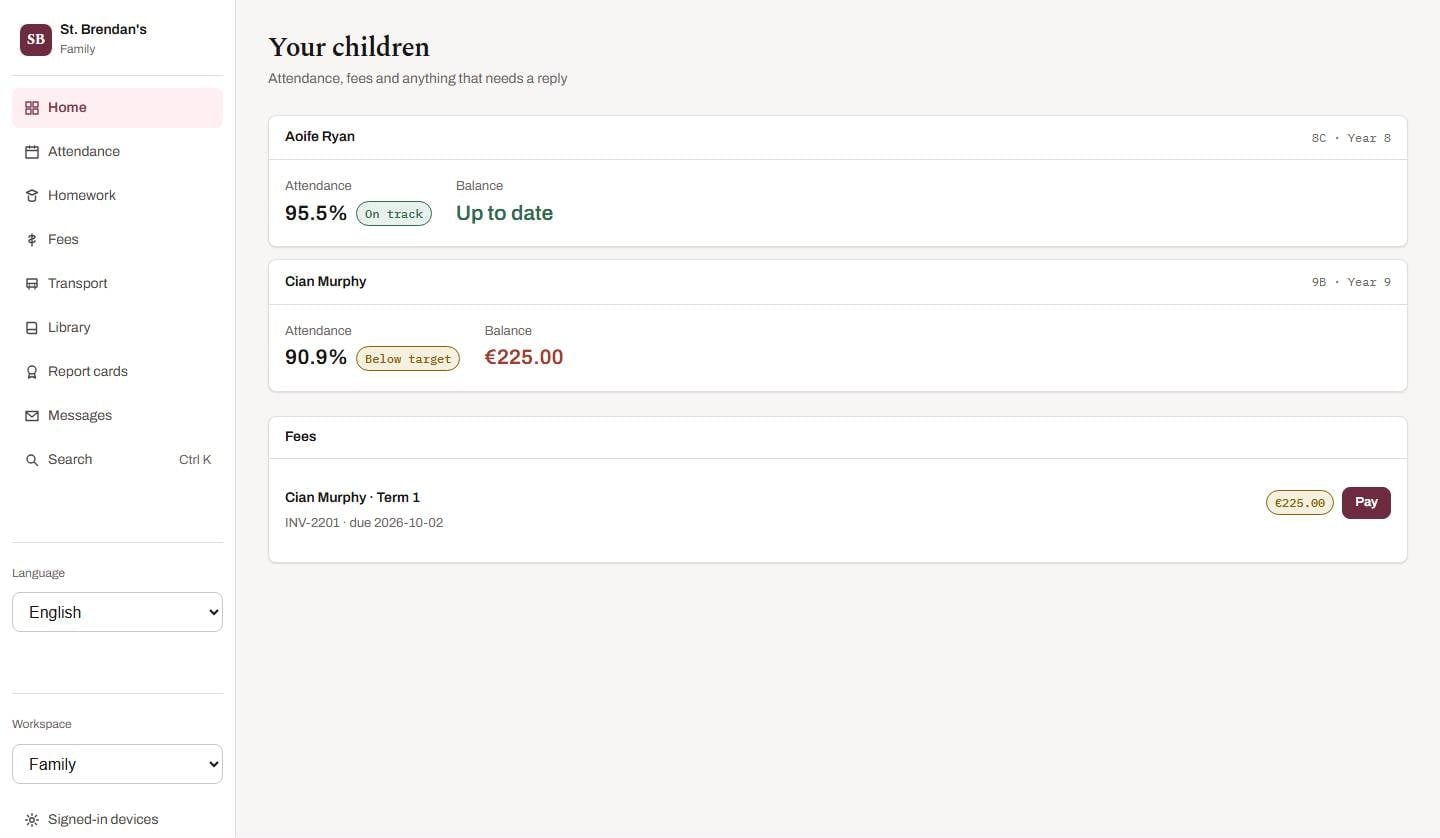
Two children, and nothing else.
A parent sees their own children — decided by the server on every request, not by hiding things. Attendance, fees, the school bus, reports and library renewals, on the web or a phone.
- Attendance day by day, in the school's own words
- Pay fees in one tap through your provider's secure page
- School bus journeys and delay notices
- Published report cards and marked homework
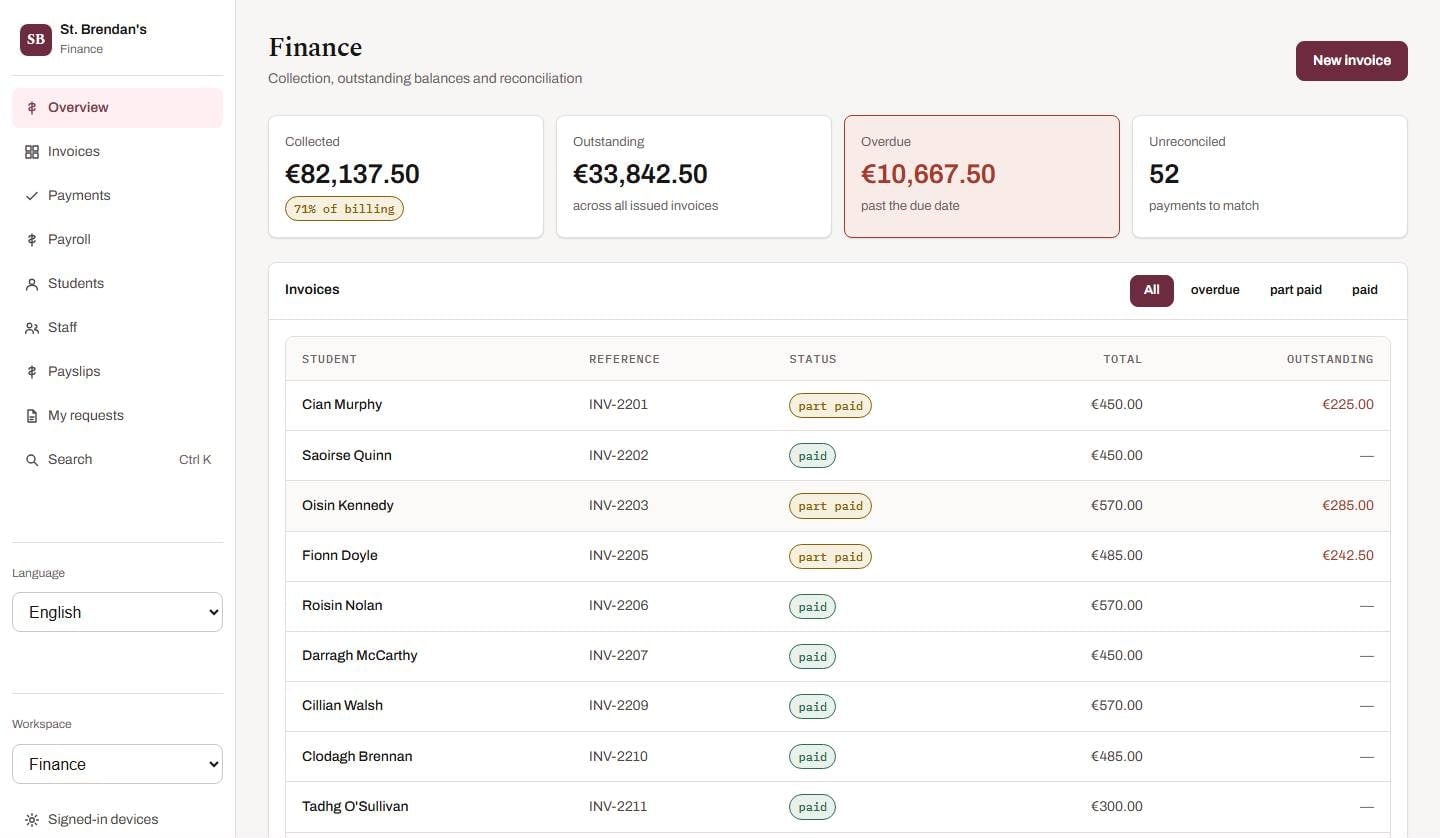
Collected, outstanding, overdue, unreconciled.
Finance opens on the four numbers a bursar checks first, then every invoice by status. Payments reconcile against invoices, and payroll finalises only when you deliberately type the month.
- Invoices per student with clear status
- Reconcile payments against invoices
- Idempotent payments — never charged twice
- Payroll drafts, payslips and a deliberate finalise
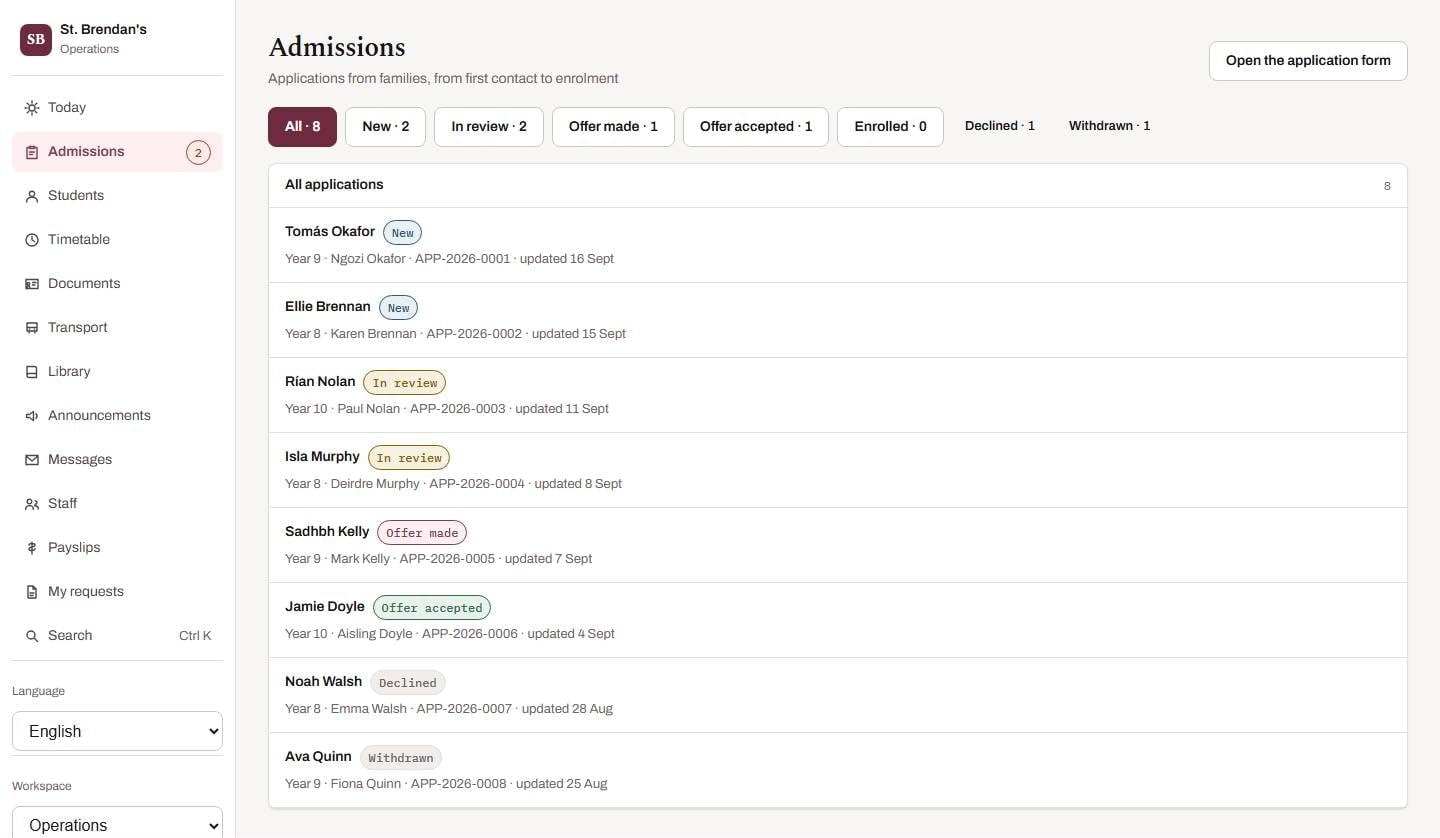
From first enquiry to first day.
The office runs admissions from a public application form through review to enrolment — which creates the pupil and guardian account together — and looks after ID cards, buses and the library desk.
- A stage-by-stage admissions pipeline
- One-click enrolment with guardian account
- Bulk import from a spreadsheet with a full preview
- Transport rosters, ID cards and the library desk
How it works
From decision to first register in four steps.
No procurement project, no installation. Buy it online, connect it, and start.
01
Choose your size
Pick a plan and the number of students. You see the exact price straight away, and no account is needed to look.
02
Subscribe securely
Pay through Stripe, yearly, half-yearly or quarterly. Your card details never touch our servers.
03
Connect your school
We connect your school to your subscription for you. There is no key to copy, and renewals reach your school automatically.
04
Invite everyone
Add staff, then families. Each person opens on the screen that matters to them and sees only their own part.
Security and trust
Children’s data deserves careful engineering.
Schoolhouse is built so the safe thing is the default thing — and then it is tested: 277 end-to-end checks, 32 unit tests over the shared rules, contract checks on API responses, and accessibility scans across 24 screens.
Data-processing agreements are available on request.
The server decides, not the screen
A parent sees their own children and nothing else — checked on every request, so it holds for the web, the phone and the API.
Sessions you can end
Rotating refresh tokens with reuse detection, a list of signed-in devices, and remote sign-out.
Files checked by their contents
Uploads are typed by their bytes, not their names; SVGs are refused; downloads go only to people in the conversation.
ID cards that can be revoked
Cards carry a signed code, not a student ID. Reprinting cancels the old card, so a lost one stops working.
Payments that can't double
Card details stay with your payment provider, and every payment is idempotent — a retry never charges twice.
A schema that's checked
Versioned migrations own the database, and the API refuses to start against one it doesn't recognise.
Simple, per-student pricing
Know the price before you talk to anyone.
Choose your size and see the exact cost. Pay yearly for the best rate, or half-yearly or quarterly.
Students are licensed in blocks of 100: 100, 200, 300 and so on.
More than 5,000 students, or a group of schools? Talk to sales.
Custom development
Need something that doesn’t exist yet? We’ll build it.
Every school is different. Tell us what you need — a report layout, a grading scale, a fee structure, an integration, a workflow — and we’ll scope it, quote a fixed price and build it on the platform itself, so upgrades carry it forward.
- Report cards and grading scales
- Fee structures
- Integrations
- Workflows and approvals
- White-label and app-store publishing
- Certificates, ID cards and letters
- Statutory payroll for your country
- More languages
How a custom change works
- 1
Send an inquiry
Describe what you need in plain words. No technical detail required — a screenshot or an example document helps.
- 2
Discovery call
We ask the questions that matter, usually in one call, and tell you honestly whether it's a small tweak or a bigger build.
- 3
Fixed-price proposal
You receive a written scope, timeline and price before any work starts. No hourly surprises.
- 4
Build, review, launch
We build it on the platform itself, you review it before it goes live, and upgrades carry it forward.
Questions, answered
Everything a school asks before it says yes.
Can’t find what you’re looking for? Ask us directly — a real person will reply.
What is Schoolhouse?
Schoolhouse is an all-in-one school management system. One backend powers a desktop and web app (iOS and Android apps are coming soon), covering admissions, attendance, timetables, coursework, report cards, fees, transport, library, documents, communication and payroll — with a workspace tailored to each role: principal, teacher, family, student, finance and office.
Which schools is it for?
Primary and secondary schools, international schools, independent and community schools, and groups of schools. It is designed for schools of any size, in any country — with right-to-left language support, multi-currency fees and registers that work with poor connectivity.
Does it work without a reliable internet connection?
Yes, where it matters most. Registers taken with no connection are saved on the device and sent exactly once when the signal returns; bus boarding scans work the same way. Everything queued is visible in a 'Waiting to send' screen, and can be reviewed or discarded.
Which languages does it support?
The app ships in English, Irish (Gaeilge) and Arabic, and Arabic mirrors the entire layout right-to-left rather than merely translating a left-to-right page. More languages, with native-speaker review, are available on request.
Can you customise Schoolhouse for our school?
Yes. Report layouts, grading scales, fee structures, workflows, integrations, branding and deployment can all be tailored. Send us an inquiry describing what you need and we will scope it and quote a fixed price before any work begins.
Where is our data stored, and who owns it?
Your school owns its data. Depending on your plan we host in the cloud region you choose, or deploy to your own private cloud or on-premise servers, so data can stay where your regulations require.
How do families pay fees?
Families pay online through your payment provider's own hosted checkout, which keeps card details off the school's systems entirely. Each payment is idempotent, so a double-tap or a retry on a poor connection can never charge someone twice.
How is student data protected?
Access is decided by the server on every request, not by hiding things in the interface: a parent sees their own children and nothing else, and teachers see only what their role allows. Sessions use rotating refresh tokens with reuse detection, files are checked by their contents, and ID cards carry signed codes rather than student IDs. See our Security page for detail.
How long does it take to get started?
Many schools are running in a matter of weeks. Students and staff can be imported from a spreadsheet with a full preview of any errors before anything is saved, and we can assist with migration from your current system.
Is Schoolhouse accessible?
Accessibility is built in, not bolted on: 44-pixel minimum touch targets, school colours that fail contrast checks are rejected rather than merely warned about, full keyboard navigation with a command palette, reduced-motion support, and automated accessibility scans across every main screen for each role.

See Schoolhouse running a school like yours.
Book a live walkthrough with a fully populated sample school — or tell us what you need and we'll put together a proposal.
Prefer email? aqbutt05@gmail.com